Thursday, January 20, 2022

UGC-NET Computer Science Unix Questions with Explanation

passwd Command in Unix:

The command that we use in a Unix system to change password is passwd (Note spelling correctly).
passwd:

$ passwd
Old   Password :   **********[enter]
New  Password :  *********[enter]
Renter Password : *********[enter]

$ _
(Prompt is returned-command completes)

Event Handling in JAVA

 Event handling is fundamental to Java programming because it is integral to the creation of  GUI-based programs. Furthermore, any program that uses a graphical user interface, such as a Java application written for Windows, is event driven. Thus, you cannot write these types of programs without a solid command of event handling. Events are supported by a number of packages, including java.util, java.awt, and java.awt.event. Most events to which your program will respond are generated when the user interacts with a GUI-based program. They are passed to your program in a variety of ways, with the specific method dependent upon the actual event. There are several types of events, including those generated by the mouse, the keyboard, and various GUI controls, such as a push button, scroll bar, or check box.

The Delegation Event Model

The modern approach to handling events is based on the delegation event model, which defines standard and consistent mechanisms to generate and process events. Its concept is quite simple: a source generates an event and sends it to one or more listeners. In this scheme, the listener simply waits until it receives an event. Once an event is received, the listener processes the event and then returns. The advantage of this design is that the application logic that processes events is cleanly separated from the user interface logic that generates those events. A user interface element is able to “delegate” the processing of an event to a separate piece of code. In the delegation event model, listeners must register with a source in order to receive an event notification. This provides an important benefit: notifications are sent only to listeners that want to receive them. This is a more efficient way to handle events than the design used by the old Java 1.0 approach. Previously, an event was propagated up the containment hierarchy until it was handled by a component. This required components to receive events that they did not process, and it wasted valuable time. The delegation event model eliminates this overhead.

Note: Event here is actual object of particular Event.


Events

In the delegation model, an event is an object that describes a state change in a source. It can be generated as a consequence of a person interacting with the elements in a graphical user interface. Some of the activities that cause events to be generated are pressing a button, entering a character via the keyboard, selecting an item in a list, and clicking the mouse. Many other user operations could also be cited as examples. Events may also occur that are not directly caused by interactions with a user interface. For example, an event may be generated when a timer expires, a counter exceeds a value, a software or hardware failure occurs, or an operation is completed. You are free to define events that are appropriate for your application. 

Event Sources

A source is an object that generates an event. This occurs when the internal state of that object changes in some way. Sources may generate more than one type of event. A source must register listeners in order for the listeners to receive notifications about a specific type of event. Each type of event has its own registration method. 

Here is the general form: public void addTypeListener(TypeListener el) 

Here, Type is the name of the event, and el is a reference to the event listener. For example, the method that registers a keyboard event listener is called addKeyListener( ). The method that registers a mouse motion listener is called addMouseMotionListener( ). When an event occurs, all registered listeners are notified and receive a copy of the event object. This is known as multicasting the event. In all cases, notifications are sent only to listeners that register to receive them.

A source must also provide a method that allows a listener to unregister an interest in a specific type of event. 

The general form of such a method is this: public void removeTypeListener(TypeListener el)

Here, Type is the name of the event, and el is a reference to the event listener. For example, to remove a keyboard listener, you would call removeKeyListener( ). The methods that add or remove listeners are provided by the source that generates events. For example, the Component class provides methods to add and remove keyboard and mouse event listeners.

Event Listeners

A listener is an object that is notified when an event occurs. It has two major requirements. First, it must have been registered with one or more sources to receive notifications about specific types of events. Second, it must implement methods to receive and process these notifications. The methods that receive and process events are defined in a set of interfaces found in java.awt.event. For example, the MouseMotionListener interface defines two methods to receive notifications when the mouse is dragged or moved. Any object may receive and process one or both of these events if it provides an implementation of this interface.

Event Classes

The classes that represent events are at the core of Java’s event handling mechanism. Thus, a discussion of event handling must begin with the event classes. It is important to understand, however, that Java defines several types of events and that not all event classes can be discussed in this chapter. The most widely used events are those defined by the AWT and those defined by Swing. 

At the root of the Java event class hierarchy is EventObject, which is in java.util. It is the superclass for all events.

 Its one constructor is shown here: EventObject(Object src)

Here, src is the object that generates this event. EventObject contains two methods: getSource( ) and toString( ). The getSource( ) method returns the source of the event.

Its general form is shown here: Object getSource( ) 

As expected, toString( ) returns the string equivalent of the event.

The class AWTEvent, defined within the java.awt package, is a subclass of EventObject. It is the superclass (either directly or indirectly) of all AWT-based events used by the delegation event model. Its getID( ) method can be used to determine the type of the event.

The signature of this method is shown here: int getID( ) 

The package java.awt.event defines many types of events that are generated by various user interface elements.


Monday, June 21, 2021

Inter Thread Communication in java

multithreading replaces event loop programming by dividing your

tasks into discrete, logical units. Threads also provide a secondary benefit: they do away

with polling. Polling is usually implemented by a loop that is used to check some condition

repeatedly. Once the condition is true, appropriate action is taken. This wastes CPU time.

For example, consider the classic queuing problem, where one thread is producing some

data and another is consuming it. To make the problem more interesting, suppose that the

producer has to wait until the consumer is finished before it generates more data. In a polling system, the consumer would waste many CPU cycles while it waited for the producer to

produce. Once the producer was finished, it would start polling, wasting more CPU cycles

waiting for the consumer to finish, and so on. Clearly, this situation is undesirable.

To avoid polling, Java includes an elegant interprocess communication mechanism via

the wait( ), notify( ), and notifyAll( ) methods. These methods are implemented as final

methods in Object, so all classes have them. All three methods can be called only from

within a synchronized context. Although conceptually advanced from a computer science

perspective, the rules for using these methods are actually quite simple:

• wait( ) tells the calling thread to give up the monitor and go to sleep until some

other thread enters the same monitor and calls notify( ).

• notify( ) wakes up a thread that called wait( ) on the same object.

• notifyAll( ) wakes up all the threads that called wait( ) on the same object. One of

the threads will be granted access.

These methods are declared within Object, as shown here:

final void wait( ) throws InterruptedException

final void notify( )

final void notifyAll( )

Additional forms of wait( ) exist that allow you to specify a period of time to wait.

Before working through an example that illustrates interthread communication, an

important point needs to be made. Although wait( ) normally waits until notify( ) or

notifyAll( ) is called, there is a possibility that in very rare cases the waiting thread could be

awakened due to a spurious wakeup. In this case, a waiting thread resumes without notify( )

or notifyAll( ) having been called. (In essence, the thread resumes for no apparent reason.)

Because of this remote possibility, Sun recommends that calls to wait( ) should take place

within a loop that checks the condition on which the thread is waiting. The following

example shows this technique.

 //Inter Thread Communication in java

class Shared

{

int n;

boolean available=false;

Shared(int x)

{

n=x;

}

synchronized void produce(int x)

{

while(available)

{

try

{

wait();

}

catch(InterruptedException e){}

}

n=x;

available=true;

notify();

}

synchronized int consume()

{

while(!available)

{

try

{

wait();

}

catch(InterruptedException e){}

}

available=false;

notify();

return n;

}

}

class Producer implements Runnable

{

Shared s;

Producer(Shared s1)

{

s=s1;

}

public void run()

{

for(int i=1;i<=10;i++)

{

s.produce(i);

System.out.println("Produced "+i);

}

}

}

class Consumer implements Runnable

{

Shared s;

Consumer(Shared s1)

{

s=s1;

}

public void run()

{

for(int i=1;i<=10;i++)

{

System.out.println("Consumed "+s.consume());

}

}

}

class InterThreadComDemo

{

public static void main(String args[])

{

Shared ob=new Shared(-1);

Producer p=new Producer(ob);

Consumer c=new Consumer(ob);

Thread t1=new Thread(p);

Thread t2=new Thread(c);

t1.start();

t2.start();

}

}

Deadlocks in JAVA

A special type of error that you need to avoid that relates specifically to multitasking is

deadlock, which occurs when two threads have a circular dependency on a pair of synchronized

objects. For example, suppose one thread enters the monitor on object X and another thread

enters the monitor on object Y. If the thread in X tries to call any synchronized method on Y,

it will block as expected. However, if the thread in Y, in turn, tries to call any synchronized

method on X, the thread waits forever, because to access X, it would have to release its own

lock on Y so that the first thread could complete. Deadlock is a difficult error to debug for

two reasons:

• In general, it occurs only rarely, when the two threads time-slice in just the right way.

• It may involve more than two threads and two synchronized objects

//Deadlocks in java

 class DeadLockDemo

{

public static void main(String args[])

{

String r1="Resource 1";

String r2="Resource 2";

Thread t1=new Thread()

{

public void run()

{

synchronized(r1)

{

System.out.println("Locked R1");

try

{

Thread.sleep(300);

}

catch(Exception e){}

synchronized(r2)

{

System.out.println("Locked R2");

}

}

}

};

Thread t2=new Thread()

{

public void run()

{

synchronized(r2)

{

System.out.println("Locked R2");

try

{

Thread.sleep(300);

}

catch(Exception e){}

synchronized(r1)

{

System.out.println("Locked R1");

}

}

}

};

t1.start();

t2.start();

}

}

Rethrowing Exception in JAVA

 A Java exception is an object that describes an exceptional (that is, error) condition that has

occurred in a piece of code. When an exceptional condition arises, an object representing

that exception is created and thrown in the method that caused the error. That method may

choose to handle the exception itself, or pass it on. Either way, at some point, the exception

is caught and processed. Exceptions can be generated by the Java run-time system, or they

can be manually generated by your code. Exceptions thrown by Java relate to fundamental

errors that violate the rules of the Java language or the constraints of the Java execution

environment. Manually generated exceptions are typically used to report some error condition

to the caller of a method.

Java exception handling is managed via five keywords: try, catch, throw, throws, and

finally. Briefly, here is how they work. Program statements that you want to monitor for

exceptions are contained within a try block. If an exception occurs within the try block, it is

thrown. Your code can catch this exception (using catch) and handle it in some rational manner.

System-generated exceptions are automatically thrown by the Java run-time system. To

manually throw an exception, use the keyword throw. Any exception that is thrown out of

a method must be specified as such by a throws clause. Any code that absolutely must be

executed after a try block completes is put in a finally block.

//Rethrowing Exception in JAVA

class ExceptionDemo

{

static void divide(int a,int b)

{

try

{

System.out.println("a/b = "+a/b);

}

catch(ArithmeticException e)

{

System.out.println("ArithmeticException caught in divide");

System.out.println("Rethrowing e");

throw e;

}

}

public static void main(String args[])

{

try

{

divide(10,2);

divide(20,0);

}

catch(ArithmeticException e)

{

System.out.println("ArithmeticException Caught in main");

}

}

}

User Defined Exception in JAVA

Although Java’s built-in exceptions handle most common errors, you will probably want

to create your own exception types to handle situations specific to your applications. This

is quite easy to do: just define a subclass of Exception (which is, of course, a subclass of

Throwable). Your subclasses don’t need to actually implement anything—it is their existence

in the type system that allows you to use them as exceptions.

The Exception class does not define any methods of its own. It does, of course, inherit

those methods provided by Throwable. Thus, all exceptions, including those that you create,

have the methods defined by Throwable available to them.Exception defines four constructors. Two were added by JDK 1.4 to support chained

exceptions, described in the next section. The other two are shown here:

Exception( )

Exception(String msg)

The first form creates an exception that has no description. The second form lets you specify

a description of the exception.

Although specifying a description when an exception is created is often useful, sometimes

it is better to override toString( ). Here’s why: The version of toString( ) defined by Throwable

(and inherited by Exception) first displays the name of the exception followed by a colon, which

is then followed by your description. By overriding toString( ), you can prevent the exception

name and colon from being displayed. This makes for a cleaner output, which is desirable in

some cases.


 //User defined exception when radius of circle is negative

class MyException extends Exception

{

MyException()

{

//Empty Constructor must be there

}

MyException(String str)

{

super(str);

}

}

class DemoException

{

static double area(double r) throws MyException

{

if(r<0)

throw new MyException("Radius cannot be negative");

return 3.14*r*r;

}

public static void main(String args[])

{

try

{

System.out.println("Area is "+area(-10.0));

}

catch(MyException e)

{

//e.printStackTrace();

                        System.out.println(e.getMessage());//It will print Radius cannot be negative 

}

finally

{

System.out.println("Inside Finally");

}

System.out.println("Program Ends");

}

}

Sunday, September 6, 2020

UGC-NET Computer Science Previous Year Question Papers

 UGC-NET NOVEMBER 2017 QUESTIONS WITH EXPLANATION 

CBSE-NET NOVEMBER 2017 QUESTIONS WITH EXPLANATION 

NTA-NET NOVEMBER 2017 QUESTIONS WITH EXPLANATION 

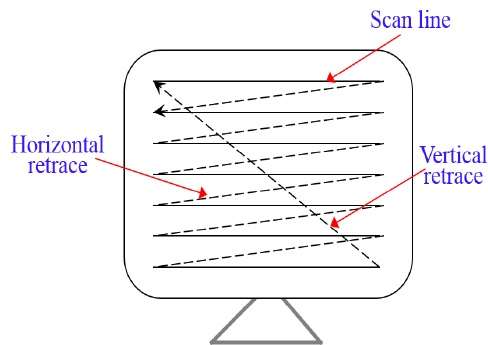
Q:15 With respect to CRT, the horizontal retrace is defined as:

(A) The path an electron beam takes when returning to the left side of the CRT.

(B) The path an electron beam takes when returning to the right side of the CRT.

(C) The technique of turning the electron beam off while retracing.

(D) The technique of turning the electron beam on/off while retracing.


Answer: (A)

Explanation: In computer graphics Horizontal Retrace is defined as: The path an electron beam takes when returning to the left side of the CRT.

Raster Scan and Random Scan Display in Computer Graphics

The scanning process sweeps the beam from left to right across the screen. At the end of the scanline the beam is moved to the start of the next (horizontal retrace). After the last scanline the beam is returned to the start position. (Vertical retrace).
So, option (A) is correct.

UGC-NET Computer Science Previous Year Question Papers

 UGC-NET NOVEMBER 2017 QUESTIONS WITH EXPLANATION 

CBSE-NET NOVEMBER 2017 QUESTIONS WITH EXPLANATION 

NTA-NET NOVEMBER 2017 QUESTIONS WITH EXPLANATION 


Q:14 Which of the following is not true in case of Oblique Projections?
(A) Parallel projection rays are not perpendicular to the viewing plane.
(B) Parallel lines in space appear parallel on the final projected image.
(C) Used exclusively for pictorial purposes rather than formal working drawings.
(D) Projectors are always perpendicular to the plane of projection.


Answer: (D)

Explanation: 


(A) → Parallel projection rays are not perpendicular to the viewing plane. TRUE
(B) → Parallel lines in space appear parallel on the final projected image. TRUE
(C) → Used exclusively for pictorial purposes rather than formal working drawings. TRUE

(D) → Projectors are always perpendicular to the plane of projection. False

The projectors in oblique projection intersect the projection plane at an oblique angle to produce the projected image, as opposed to the perpendicular angle used in orthographic projection. 

So, option (D) is correct.

UGC-NET Computer Science Previous Year Question Papers

 UGC-NET NOVEMBER 2017 QUESTIONS WITH EXPLANATION 

CBSE-NET NOVEMBER 2017 QUESTIONS WITH EXPLANATION 

NTA-NET NOVEMBER 2017 QUESTIONS WITH EXPLANATION 

Q:11 Given two relations R1(A, B) and R2(C, D), the result of following query

Select distinct A, B
from R1, R2

is guaranteed to be same as R1 provided one of the following condition is satisfied.
(A) R1 has no duplicates and R2 is empty.
(B) R1 has no duplicates and R2 is non – empty.
(C) Both R1 and R2 have no duplicates.
(D) R2 has no duplicates and R1 is non – empty.


Answer: (B)

Explanation: Select A,B
From R1, R2 :
In this query first we will take Cartesian product of R1, R2 (R2 must be non empty)for this 0- R2 then select distinct A,B from Cartesian product of R1, R2 (for A,B being distinct there should not any duplicate A,B).
And
Select A,B
From R2
For this query A,B → No duplicate A,B.
By combining condition for both query we will get the right condition.
So, option (B) is correct.

Friday, August 28, 2020

UGC-NET Computer Science Previous Year Question Papers

UGC-NET NOVEMBER 2017 QUESTIONS WITH EXPLANATION 

CBSE-NET NOVEMBER 2017 QUESTIONS WITH EXPLANATION 

NTA-NET NOVEMBER 2017 QUESTIONS WITH EXPLANATION 


Q:10 Consider a relation R (A, B, C, D, E, F, G, H), where each attribute is atomic, and following functional dependencies exist.

CH → G
A → BC
B → CFH
E → A
F → EG

The relation R is __________ .
(A) in 1NF but not in 2NF
(B) in 2NF but not in 3NF
(C) in 3NF but not in BCNF
(D) in BCNF


Answer: (A)

Explanation: If we find closure of A:

A+ → All atribute except D.
Similarly for other keys we can find closure, but D can’t be derived from any key and it must be added to all keys to be derived from. That’s why this relation is in 1NF, since there is partial dependency so, this relation is not in 2NF.
So, option (A) is correct.

UGC-NET Computer Science Previous Year Question Papers

 UGC-NET NOVEMBER 2017 QUESTIONS WITH EXPLANATION 

CBSE-NET NOVEMBER 2017 QUESTIONS WITH EXPLANATION 

NTA-NET NOVEMBER 2017 QUESTIONS WITH EXPLANATION


Q: 9 If every non-key attribute is functionally dependent on the primary key, then the relation is in __________ .

(A) First normal form
(B) Second normal form
(C) Third normal form
(D) Fourth normal form


Answer: (B)

Explanation: Conditions for various normal forms:

  1. 1 NF – A relation R is in first normal form (1NF) if and only if all underlying domains contain atomic values only.
  2. 2 NF – A relation R is in second normal form (2NF) if and only if it is in 1NF and every non-key attribute is fully dependent on the primary key.
  3. 3 NF – A relation R is in third normal form (3NF) if and only if it is in 2NF and every non-key attribute is non-transitively dependent on the primary key.
  4. BCNF – A relation R is in Boyce-Codd normal form (BCNF) if and only if every determinant is a candidate key.


UGC-NET Computer Science Previous Year Question Papers

  UGC-NET NOVEMBER 2017 QUESTIONS WITH EXPLANATION 

CBSE-NET NOVEMBER 2017 QUESTIONS WITH EXPLANATION 

NTA-NET NOVEMBER 2017 QUESTIONS WITH EXPLANATION 

GATE 2016 SET-2 Q:32

Topic: DBMS

Q: 8 Suppose a database schedule S involves transactions T1, T2, ………….,Tn. Consider the precedence graph of S with vertices representing the transactions and edges representing the conflicts. If S is serializable, which one of the following orderings of the vertices of the precedence graph is guaranteed to yield a serial schedule ?

(A) Topological order
(B) Depth – first order
(C) Breadth – first order
(D) Ascending order of transaction indices


Answer: (A)

Explanation: For a schedule, we can check its serializability by drawing a precedence graph and find its topological order, precedence graph of schedule must not contain any cycle to be conflict free.

Cycle in precedence graph tells that schedule is not conflict serializable. DFS and BFS traversal of graph are possible even if graph contains cycle. And hence DFS and BFS are also possible for non serializable graphs. But Topological sort of any cyclic graph is not possible. Thus topological sort guarantees graph to be serializable . Option D is not valid because in a transaction with more indices might have to come before lower one. Also two non- conflicting schedule can occur simultaneously.

So, option (A) is correct.

UGC-NET Computer Science Previous Year Question Papers

 UGC-NET NOVEMBER 2017 QUESTIONS WITH EXPLANATION 

CBSE-NET NOVEMBER 2017 QUESTIONS WITH EXPLANATION 

NTA-NET NOVEMBER 2017 QUESTIONS WITH EXPLANATION 


Question 65 GATE-CS-2014-(Set-1) | Question 65 2014 GATE

Q:7 Consider the following four schedules due to three transactions (indicated by the subscript) using read and write on a data item X, denoted by r(X) and w(X) respectively. Which one of them is conflict serializable ?

S1: r1(X); r2(X); w1(X); r3(X); w2(X)

S2: r2(X); r1(X); w2(X); r3(X); w1(X)

S3: r3(X); r2(X); r1(X); w2(X); w1(X)

S4: r2(X); w2(X); r3(X); r1(X); w1(X)

(A) S1
(B) S2
(C) S3
(D) S4


Answer: (D)

Explanation: We can draw precedence graph for each schedule and for conflict serializability graph must not contain cycle.
conflict


So, option (D) is correct.

UGC-NET Computer Science Previous Year Question Papers

 UGC-NET NOVEMBER 2017 QUESTIONS WITH EXPLANATION 

CBSE-NET NOVEMBER 2017 QUESTIONS WITH EXPLANATION 

NTA-NET NOVEMBER 2017 QUESTIONS WITH EXPLANATION 

Q:6 A micro-instruction format has micro-ops field which is divided into three subfields F1, F2, F3 each having seven distinct micro-operations, condition field CD for four status bits, branch field BR having four options used in conjunction with address field ADF. The address space is of 128 memory locations. The size of micro-instruction is:

(A) 17
(B) 20
(C) 24
(D) 32


Answer: (B)

Explanation: Microprocessor instruction format, which is divided into three subfields F1, F2, F3 each having seven distinct micro-operations, condition field CD for four status bits, branch field BR having four options used in conjunction with address field ADF. The address space is of 128 memory locations.ie:
q8
F1,F2,F3 each having seven distinct micro-operation. So, 3 bits are required for each.
Condition field have four status, it needs 2 bits for four different condition.
Branch field have four option so,it needs 2 bits for four option.
Now there are 128 different memory location, So, there 7 bits atre required for 128 diffeent location.
Instruction Field:
q8 (1)Total bits are 20.
So, option (B) is correct.

Wednesday, August 26, 2020

UGC-NET Computer Science Previous Year Question Papers


UGC-NET NOVEMBER 2017 QUESTIONS WITH EXPLANATION 
CBSE-NET NOVEMBER 2017 QUESTIONS WITH EXPLANATION 

NTA-NET NOVEMBER 2017 QUESTIONS WITH EXPLANATION  

Q:5 Which of the following is correct statement ?

(A) In memory – mapped I/O, the CPU can manipulate I/O data residing in interface registers that are not used to manipulate memory words.
(B) The isolated I/O method isolates memory and I/O addresses so that memory address range is not affected by interface address assignment.
(C) In asynchronous serial transfer of data the two units share a common clock.
(D) In synchronous serial transmission of data the two units have different clocks.


Answer: (B)

Explanation:

  • The isolated I/O method isolates memory and I/O addresses so that memory address range is not affected by interface address assignment.
  • Memory based I/O uses same address space for memory and I/O devices.
  • In asynchronous serial transfer of data the two units do not share a common clock.
  • In synchronous serial transfer of data the two units share a common clock.
Option (B) is correct.

UGC-NET Computer Science Previous Year Question Papers

UGC-NET NOVEMBER 2017 QUESTIONS WITH EXPLANATION 
CBSE-NET NOVEMBER 2017 QUESTIONS WITH EXPLANATION 

NTA-NET NOVEMBER 2017 QUESTIONS WITH EXPLANATION  

Q:4 Which of the following addressing mode is best suited to access elements of an array of contiguous memory locations ?

(A) Indexed addressing mode
(B) Base Register addressing mode
(C) Relative address mode
(D) Displacement mode


Answer: (A)

Explanation: Indexed addressing mode is best suited for accessing an array in contiguous memory location.
So, option (A) is correct.
UGC-NET NOVEMBER 2017 QUESTIONS WITH EXPLANATION 
CBSE-NET NOVEMBER 2017 QUESTIONS WITH EXPLANATION 
NTA-NET NOVEMBER 2017 QUESTIONS WITH EXPLANATION 

Q:3 In the architecture of 8085 microprocessor match the following:

1

(A) (1)
(B) (2)
(C) (3)
(D) (4)


Answer: (B)

Explanation:

  • ALU is the arithmetic logic unit and it involves processing of input into desired output.
  • Timing and control instruction are covered in instruction unit of microprocessor.
  • There are some general purpose register in storage and interface unit.
  • While an interrupt is a signal to the processor which required attention from processor, an interrupt is serviced on the basis of priority and need.

So, option (B) is correct.

UGC-NET Computer Science Previous Year Question Papers

 UGC-NET NOVEMBER 2017 QUESTIONS WITH EXPLANATION 

CBSE-NET NOVEMBER 2017 QUESTIONS WITH EXPLANATION 

NTA-NET NOVEMBER 2017 QUESTIONS WITH EXPLANATION 

Q:2 In 8085 microprocessor the address bus is of __________ bits.
(A) 4
(B) 8
(C) 16
(D) 32


Answer: (C)

Explanation: In 8085 microprocessor 16 bits are used for address bus and 65,536(216 = 65,536) different memory location are possible.
So, option (C) is correct.

Sunday, August 23, 2020

UGC-NET Computer Science Previous Year Question Papers

UGC-NET NOVEMBER 2017 QUESTIONS WITH EXPLANATION 
CBSE-NET NOVEMBER 2017 QUESTIONS WITH EXPLANATION 
NTA-NET NOVEMBER 2017 QUESTIONS WITH EXPLANATION 

Q:1 In 8085 microprocessor which of the following flag(s) is (are) affected by an arithmetic operation ? 

(A) AC flag Only 
(B) CY flag Only 
(C) Z flag Only 
(D) AC, CY, Z flags 

 Answer: (D) 

Explanation: AC is auxiliary-Carry flag, CY is Carry flag and Z is Zero flag. All these flags will be affected during arithmetic operation. So, option (D) is correct.

Tuesday, May 16, 2017

C Program to Check Whether a Number is Prime or Not

C Program to Check Whether a Number is Prime or Not


#include<stdio.h>
#include<conio.h>
void main()
{
int n,i=2,f=1;
clrscr();
printf("Enter a Number other than 1");
scanf("%d",&n);
while(i*i<=n)
{
if(n%i==0)
{
f=0;
break;
}
i++;

}
if(f)
printf("Prime Number");
else
printf("Not Prime Number");
getch();
}

To check whether a number is prime or not we need to check that if the number is divisible by any of the numbers lying between 2 to squareroot(n). If it is divisible by any one of these then it is not prime otherwise the number is prime. 

Coding Acceleration Program

🚀 CODING ACCELERATION PROGRAM (90 DAYS) Build Strong Foundations Learn to Think Like a Programmer Get Placement Ready 💡 Learn C Progra...