Sunday, August 21, 2022

Increment & Decrement Operators

  • Increment (++) operator is used to increase the value of a variable by 1.

  • Decrement (--) operator is used to decrease the value of a variable by 1.

  • Both the operators are unary i.e. they only require one operand.

  • There are two forms in which ++ and - can be used:
    1.  Prefix
    2. Postfix

  • Prefix: In this form operator is written before the operand: ++a, --b.
  • Postfix: In this form operator is written after the operand: at+, b-.
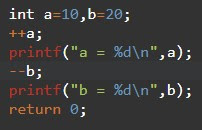
  • If there is no assignment then prefix and postfix will give same result.
    Eg:


In both cases a = 11 and b = 19


  • If there is assignment then prefix and postfix may give different result.


    x = 11 a = 11
    y = 21 b = 21

    x = 10 a = 11
    y = 20 b = 21


    Prefix


    int a =10, x;

    x=++a;

    It is calculated as a two step process:

    Step 1:a=a+1:// a will become 11

    Step 2:x=a;// x will become 11

    In case of prefix rule is:

    First increment/decrement is performed then assignment is performed.


    Postfix

    int a=10, x;

    x=a++;

    It is calculated as a two step process:


    Step 1:x=a;//
    x will become 10

    Step 2:a=a+1;//
    a will become 11

    In case of postfix rule is:

    First assignment is performed then 
    increment/decrement is performed.

    In case of following for loops both postfix & prefix will give same result:


    Both loops will print 1 to 5


    In case of printf functions result may vary:


    It will print a = 11
    It will print a = 10
    Finally a will be 11
    in both case.


    #codingmadeasy #codingmadeasy #clanguage #cprogramming #java #javaprogramming #datastructure #algorithms #complexity #coding #codeforfun #codinglife #coderlife #programming #program #computerscience #it #technology #ugc #gate #gate #nta #net

Sunday, August 14, 2022

Arithmetic Operators in C Programming

  • Arithmetic operators are used to perform basic arithmetic operations.

  • There are five Arithmetic Operators used in C Language:

    Addition(+), Subtraction(-), Multiplication(*), Division(/) & Modulus(%).

  • Modulus gives us remainder of two operands and can only be applied on integer data.

  • Addition, subtraction, multiplication and division can be applied on both integer as well as real data.

  • Arithmetic operators are binary in nature i.e. they require at least two operands to perform operation.

  • Arithmetic Operators can be Applied on both +ve as well as -ve numbers.

  • Symbols used for Arithmetic operators are:


  • Arithmetic Operation Eg:


  • Applying '/' & '%' on -ve numbers :


  • On applying '%' to -ve numbers, sign of numerator will be assigned to the result.


Program


Output


#codingmadeasy #codingmadeasy #clanguage #cprogramming #java #javaprogramming #datastructure #algorithms #complexity #coding #codeforfun #codinglife #coderlife #programming #program #computerscience #it #technology #ugc #gate #gate #nta #net

Saturday, August 13, 2022

Selection Sort Technique, Complexity & Program

  •  Suppose we want to arrange numbers of a list in ascending order.


  • We will divide our list in two parts: Sorted List & Unsorted List.

  • Initially all the elements are considered as Unsorted.


  • Now we will find minimum element from the unsorted list & swap it with the first element of unsorted list.


  • Now "1" will become part of Sorted List & we will repeat our process for remaining unsorted part.


  • Again we will find minimum element from unsorted list & swap it with the first element of unsorted list.


  • "2" will become part of sorted list & process will be repeated for remaining unsorted list.


  • Again we will find minimum element from unsorted list & swap it with first element of unsorted list.


  • "3" will become part of sorted list & we will repeat our process for remaining unsorted list.


  • Again we will find minimum element from unsorted list & swap it with first element of unsorted list.


  • As "5" is minimum element & it is already at its correct position so, no swap is required.


  • Similarly the remaining elements of unsorted list will become part of sorted list.


    Program

    //Selection Sort
    #include<iostream.h>
    #include<conio.h>
    int selection_sort(int a[],int n)
    {
    int i,j,t,u;
    for(i=0;i<n-1;i++)
    {
    u=i;//index of first element of unsorted list
    for(j=i+1;j<n;j++)
    {
    if(a[j]<a[u])
    u=j;//updated when
       //element less than minimum is found
    }
    if(i!=u)//no need to swap
    {       //if element is already at correct position
    t=a[i];
    a[i]=a[u];
    a[u]=t;
    }
    }
    }
    void main()
    {
    int a[]={12,5,8,2,1,7,3},i;
    clrscr();
    selection_sort(a,7);
    cout<<"Sorted Array"<<endl;
    for(i=0;i<7;i++)
    {
    cout<<a[i]<<endl;
    }

    getch();
    }


    Selection Sort technique, complexity & program with minimum number of swaps. https://www.instagram.com/reel/Cg6So4Uhwza/?igshid=YmMyMTA2M2Y= #datastructure #sorting #searching #minimumelement #bestcoding #goodcode #leetcode #aws #python #cprogram #cprogramming #bca #mca #it #cs #complexity #clanguage #java #javascripSot #DeveloperMode Selection Sort Program Algorithm to sort integers Sorting of Integer numbers

Monday, August 1, 2022

Binary Search : Technique, Program & Complexity

Technique

  • Let us say we have a book of "600" pages and we want to read page number "338", one method is to apply linear search and turn pages one by one which is very time consuming and inefficient.


  • Another way is that we can randomly open a page from book which may be near to 338, suppose we opened page number 420. Now we will only search our page in the left part of the book i.e. between 1 to 420.


  • Again say we got to page number 330 so, now we will search between page 330 to 420.

  • This way we can reach our page in a much efficient way.

  • Binary Search will work in a similar manner, which can only be applied on sorted data.

  • In this method we will compare the item to be searched with the item at middle index of array.


  • Say "l" is lower bound & "r" is upper bound of array, so middle will be calculated as        mid = ( l + r ) / 2.

  • Then we will compare our item with "a[mid]" element of our Array as follows:

            if ( item == a[mid] )

            return mid;

            else if ( item > a[mid] ) 

            l = mid + 1;

            else 

            r = mid - 1;

  • If item == a[mid] i.e. item is found then, we will return "mid" and our search is successful.


  • If  item > a[mid] i.e. "item" is greater than "a[mid]" then we set "l" to the element on the right of "mid" & "r" remains at its position.

  • It means item exist between "mid + 1" & "r".


  • Now, we will again calculate "mid" & repeat the process.

  • If item < a[mid] i.e. "item" is less than "a[mid]" then we set "r" to the element on the left of "mid". "l" remains at its position.
  • It means item exist between "l" & "mid - 1".


  • We will stop our search when "l" becomes greater than "r". It means search is unsuccessful and we will return -1.

Program

Example

  • Suppose we want to find location of element "17" in Array given below:


  • We will take three variables "l" , "r", & "mid". Initially we will take l=0 & r=6. (Lower Bound=0 & Upper Bound=6)

  • Then we will calculate index of middle element of our Array as ( l + r ) / 2 and store the result in mid.
    mid=( l + r ) / 2 = ( 0 + 6 ) / 2 = 3.


  • Now we will compare our item "17" with a[mid] i.e. a[3], Both are not equal.


  • So, we will check whether our item "17" is greater than a[3] or not. As "17" is greater than "10". So, "17" might exist between "mid + 1" & "r".

  • It will reduce our search bracket. Now we will set "l = mid + 1" & r will remain unchanged, i.e. "l = 4" & "r = 6".


  • Now again we will calculate mid = ( l + r )/2 = ( 4 + 6 )/2 = 5.


  • Now we will compare our item "17" with a[mid] i.e. a[5], Both are equal and our search is successful so, our algorithm will return "mid" i.e. "5"

Let us take another example

  • Suppose we want to find location of item "2" in Array given below:


  • Again we will set l=0 & r=6. (Lower Bound=0 & Upper Bound=6)

  • Set mid = ( l + r ) / 2 = ( 0 + 6 ) / 2 = 3.


  • Now we will compare our item "2" with a[mid] i.e. a[3], Both are not equal.


  • So, we will check whether our item "2" is greater than a[3] or not. As "2" is not greater than "10". So, "2" is less than a[mid] and "2" might exist between "l" & "mid-1".

  • It will reduce our search bracket. Now we will set "r = mid - 1" & "l" will remain unchanged, i.e. "l = 0" & "r = 2".


  • Now again we will calculate mid=( l + r )/2 = ( 0 + 2 )/2 = 1.


  • We will compare our item "2" with a[mid] i.e. a[1]. Again both are not equal.

  • So, we will check whether our item "2" is greater than a[1] or not. Again "2" is not greater than "5". It means "2" is less than a[mid] and "2" might exist between "l" & "mid-1".


  • It will reduce our search bracket. Now we will set "r = mid - 1" & "l" will remain unchanged, i.e. "l = 0" & "r = 0".


  • We will calculate mid = ( l + r ) / 2 = ( 0 + 0 ) / 2 = 0.

We will compare our item "2" with a[mid] i.e. a[0]. As both are equal so, our algorithm will return mid i.e. 0.


Binary Search Complexity
  • In Best case Binary Search will find the location of item in given array in only 1 comparison so, it is O(1). .
  • In Worst case at each iteration of Binary Search the array size will be reduced to its half.
  • At iteration 1, size of array = n
  • At iteration 2, size of array = n/2
  • At iteration 3, size of array = n/4
  • At iteration k, size of array = 1 .i.e. n/2^k = 1 => n = 2^k => k=log(n)
  • So, in Worst Case Complexity of Binary Search is O(log(n).
  • In Average case of Binary Search item could be found in: 1 comparison or 2 comparisons or 3 comparisons.. or log(n) comparisons where log(n) = m.
  • So, Total comparisons (1+2+3+..+m)
  • Total no. of cases = m
  • Average Comparisons = (1+2+3+...+m)/m where m = log(n). = m ( m + 1 ) / 2m = ( m + 1 ) / 2 = ( log(n) + 1 ) / 2 .
  • So, Average Complexity of Binary Search is O(log(n)).

Friday, July 29, 2022

Linear Search : Technique, Program, Algorithm & Complexity

Linear Search Technique


  • Suppose you have a single key which may or may not open one of the five doors given below.


  • We can try to unlock doors one by one randomly.
  • Or we can also start from either end and try to unlock doors in a sequential order, this is known as linear search.
  • If one of the doors is unlocked then search is successful otherwise search is unsuccessful.
  • This algorithm search an element in a given list by comparing an item with each of the elements of list one by one.
  • We can start from first element and search upto last element (o to n-1).


  • Or we can also start from the last element and search till the first element (n-1 to 0).


  • In both of the cases each location of the array is searched once.

  • Suppose we want to find location of element 15 in Array given below:
            int a[5]={22,5,3,15,7};

  • We will start comparing 15 with each of the elements of array one by one starting from a[0] to a[4].
  • If element is found then we will return its location otherwise we will return-1 treated as an invalid index of Array.

  • Firstly we will compare 15 with a[0] i.e. 22 which are not equal so, we will compare it with next element a[1] i.e. 5, again both are not equal.
item=15


  • We will continue our search process until we find our element or if we exceed upper bound of our Array.

  • In our case item is found at index "3" of given array so, 3 will be returned. item=15


  • There might be situation where array elements are duplicate in that case our algorithm will return the index of first occurrence.

  • If given element is not present in the list then our algorithm will return-1 which is treated as an invalid array index in our case.
Let us take another Example
  • In this case "2" will be returned as first occurrence of 15 is found at index 2 of our given Array.


  • In this case -1 will be returned as element is not present in our Array.

Linear Search C Program


#include<stdio.h>
#include<conio.h>
int linear_search(int a[],int n,int item)
{
int i;
for(i=0;i<n;i++)
{
if(a[i]==item)
return i;
}
return -1;
}
void main()
{
int i,a[5]={22,5,3,15,7},k,loc;
clrscr();
printf("Enter element to be searched:: ");
scanf("%d",&k);
loc=linear_search(a,5,k);
if(loc==-1)
printf("Element not found");
else
printf("Element found at %d ",loc);
getch();
}

Linear Search Time Complexity


Best Case:
  • In Best case item will be found in only one comparison i.e. at "0" index of the array. So, it is constant i.e. o(1).
Worst Case:
  • In Worst case either item will be found at last index of Array i.e. "n-1" or item is not present in the Array both of which requires total of "n" comparisons. So, it is O(n).
Average Case:
  • If element is found at location "0" then it will take 1 comparison
  • if it is found at location 1" then it will take 2 comparisons
  • if it is found at location "n-1 then it will take 'n" comparisons.
Average (1+2+3+..+n)/n = (n*(n+1))/2n =(n+1)/2=0(n).

Wednesday, May 18, 2022

Multithreading in JAVA using Thread class

 class MyThread extends Thread

{

int n;

MyThread(int x)

{

n=x;

}

public void run()

{

System.out.println("Thread"+n+"Starts");

for(int i=1;i<=10;i++)

{

System.out.println("Thread"+n+"Iteration"+i);

}

System.out.println("Thread"+n+"Ends");

}

}

class ThreadDemo

{

public static void main(String args[])

{

System.out.println("Main Thread Starts");

MyThread t1=new MyThread(1);

MyThread t2=new MyThread(2);

MyThread t3=new MyThread(3);

t1.start();

t2.start();

t3.start();

System.out.println("Main Thread Ends");

}

}

Download Java Code


Sunday, May 15, 2022

Program to implement Binary Search

 //Binary Search

#include<iostream.h>

#include<conio.h>

int binary_search(int a[],int n,int item)

{

int loc=-1,l=0,r=n-1,mid;


while(l<=r)

{

mid=(l+r)/2;

if(a[mid]==item)

{

loc=mid;

break;

}

else if(a[mid]<item)

{

l=mid+1;

}

else

{

r=mid-1;

}

}

return loc;

}

void main()

{

int a[]={2,4,5,7,11,13,15,16,22,30},p,k;

clrscr();

cout<<"Enter Item to searched";

cin>>k;

p=binary_search(a,10,k);

if(p==-1)

cout<<"Element not found"<<endl;

else

cout<<"Element found at location"<<p<<endl;

getch();

}

Download C++ Code

#linearsearch

#string #stringpermutations #strlen #getch #cprogramming #cpp #c++

#auto #break #case #char

#const #continue #default #do

#double #else #enum #extern

#float #for #goto #if

#int #long #register #return

#short #signed #sizeof #static

#struct #switch #typedef #union

#unsigned #void #volatile #while


#Keywords  #Identifier

#Variables  #Constants

#datatypes

#Input #output #functions #Binarysearch

Program to implement Circular Queue using c++

 #include<iostream.h>

#include<conio.h>

#include<stdlib.h>

#define MAX 5

int a[MAX],rear=-1,front=-1;

void enqueue(int item)

{

if(front==((rear+1)%MAX))

{

cout<<"Queue is Full\n";

}

else if(front==-1)

{

front=0;

rear=0;

a[rear]=item;

}

else

{

rear=(rear+1)%MAX;

a[rear]=item;

}

}

int dequeue()

{

int item=-1;

if(front==-1)

{

return -1;

}

else if(front==rear)

{

item=a[front];

rear=front=-1;

}

else

{

item=a[front];

front=(front+1)%MAX;

}

return item;

}

int isempty()

{

if(front==-1)

return 1;

else

return 0;

}

int isfull()

{

if(rear==MAX-1)

return 1;

else

return 0;

}

int peek()

{

if(front!=-1)

return a[front];

else

return -1;

}

void display()

{

int i;

if(front==-1)

{

cout<<"Queue is empty";

}

else

{

for(i=front;i<=rear;i++)

cout<<a[i]<<"\n";

}

if(front>rear)

{

for(i=front;i<=MAX-1;i++)

cout<<a[i]<<"\n";

for(i=0;i<=rear;i++)

cout<<a[i]<<"\n";

}

}

void main()

{

int n,item,k,loc;

char str[20];

clrscr();

while(1)

{

cout<<"\nPress 1 to enqueue\n";

cout<<"Press 2 to dequeue\n";

cout<<"Press 3 to Display\n";

cout<<"Press 4 exit\n";

cout<<"Press 5 to check empty\n";

cout<<"Press 6 to check full\n";

cout<<"Press 7 to Peek or Peep\n";

cin>>n;

switch(n)

{

case 1:

cout<<"Enter Item\n";

cin>>item;

enqueue(item);

break;

case 2: item=dequeue();

if(item==-1)

cout<<"Queue is Empty\n";

else

cout<<"Item deleted is "<<item;

break;

case 3:display();

       break;

case 4:

exit(1);

break;

case 5: if(isempty())

cout<<"Queue is Empty\n";

else

cout<<"Queue is not Empty\n";

break;

case 6: if(isfull())

cout<<"Queue is Full\n";

else

cout<<"Queue is not Full\n";

break;

case 7: item=peek();

if(item==-1)

cout<<"Queue Empty";

else

cout<<"Item on front is "<<item;

break;

default: cout<<"Wrong Input";

}

}

}

Download c++ Code

#linearsearch

#string #stringpermutations #strlen #getch #cprogramming #cpp #c++

#auto #break #case #char

#const #continue #default #do

#double #else #enum #extern

#float #for #goto #if

#int #long #register #return

#short #signed #sizeof #static

#struct #switch #typedef #union

#unsigned #void #volatile #while


#Keywords  #Identifier

#Variables  #Constants

#datatypes

#Input #output #functions

#Operators 

Linear search program using C++

 #include<iostream.h>

#include<conio.h>

int linear_search(int a[],int n,int item)

{

int i,loc=-1;


for(i=0;i<n;i++)

{

if(a[i]==item)

{

loc=i;

break;

}

}

return loc;

}                                   //  Best-  O(1)     Worst- O(n)

void main()    //Average  (1+2+3+4+...n)/n = (n*(n+1)/2)/n = (n+1)/2

//O(n)

{

int a[]={12,38,5,56,39,99,34,3,44,1000},p,k;

clrscr();

cout<<"Enter Item to searched";

cin>>k;

p=linear_search(a,10,k);

if(p==-1)

cout<<"Element not found"<<endl;

else

cout<<"Element found at location"<<p<<endl;

getch();

}

Download C++ Code 

#linearsearch

#string #stringpermutations #strlen #getch #cprogramming #cpp #c++

#auto #break #case #char

#const #continue #default #do

#double #else #enum #extern

#float #for #goto #if

#int #long #register #return

#short #signed #sizeof #static

#struct #switch #typedef #union

#unsigned #void #volatile #while


#Keywords  #Identifier

#Variables  #Constants

#datatypes

#Input #output #functions

#Operators 


Print all Permutations of a String

C Program to Print all Permutations of a String


 #include<stdio.h>

#include<conio.h>

void swap(char str[],int i,int j)

{

char ch;

ch=str[i];

str[i]=str[j];

str[j]=ch;

}

void fxn(char str[],int l,int r)

{

int i;

if(l==r)

{

printf("%s\n",str);

}

for(i=l;i<=r;i++)

{

swap(str,i,l);

fxn(str,l+1,r);

swap(str,i,l);

}


}

void main()

{

char str[]="ABCD";

clrscr();

fxn(str,0,strlen(str)-1);

getch();

}

output:


Download C Code

#string #stringpermutations #strlen #getch #cprogramming #cpp #c++

#auto #break #case #char

#const #continue #default #do

#double #else #enum #extern

#float #for #goto #if

#int #long #register #return

#short #signed #sizeof #static

#struct #switch #typedef #union

#unsigned #void #volatile #while


#Keywords  #Identifier

#Variables  #Constants

#datatypes

#Input #output #functions

#Operators 


Coding Acceleration Program

🚀 CODING ACCELERATION PROGRAM (90 DAYS) Build Strong Foundations Learn to Think Like a Programmer Get Placement Ready 💡 Learn C Progra...